
The importance of the correct repository link
Replacement of the repository link precisely and consistently is not just a technical matter, but it is also an important part of document governance and scientific work.
1. So that documents can be accessed public
Correct repository links ensure that digital documents or projects can be accessed by the public directly, without obstacles.
- Increase visibility and transparency of work.
- Facilitate lecturers, tendik, student, or the public to review or use the work.
- Guarantee that the information shared is the official and latest version.
2. Facilitate the Lecturer Academic Assessment Team (After)
In the process of assessing lecturer credit scores, especially by the operational assessment team, sir (After), Openness and ease of access to digital work becomes crucial.
- Speed up the verification process by the assessment team.
- Provide evidence of valid and well documented digital documentation.
- Minimize the risk of rejection due to the not found supporting documents.
3. Form of treasury organized work
Digital repository becomes an important means in preparing the vocabulary of the lecturer work systematically.
- Lecturer/Tendik/Student Documented works in an organized digital ecosystem.
- Facilitate monitoring of scientific contribution track records and service.
- Be part of an institutional archive that can be utilized for accreditation, reporting, and academic development in the future.
🗂️ GUIDELINES FOR REPOSITITY LESS
To ensure scientific work or academic documents can be accessed properly, arranged, and support the academic assessment process, The following guidelines in pinning the UIN One Tulungagung repository link:
1. Upload documents to the repository
- Enter the official repository page: repo.uinsatu.ac.id
- Upload documents according to the category and type of work (article, report, book, dll).*
2. Follow up upload procedures
- Complete metadata (title, writer, abstract, dll).
- Make sure the main file (Pdf or other documents) has attached.
- Save and submit uploads according to the system flow.
3. Wait for the approval process
- Admin repository will review uploads.
- After being approved, Documents will be available publicly in the system.
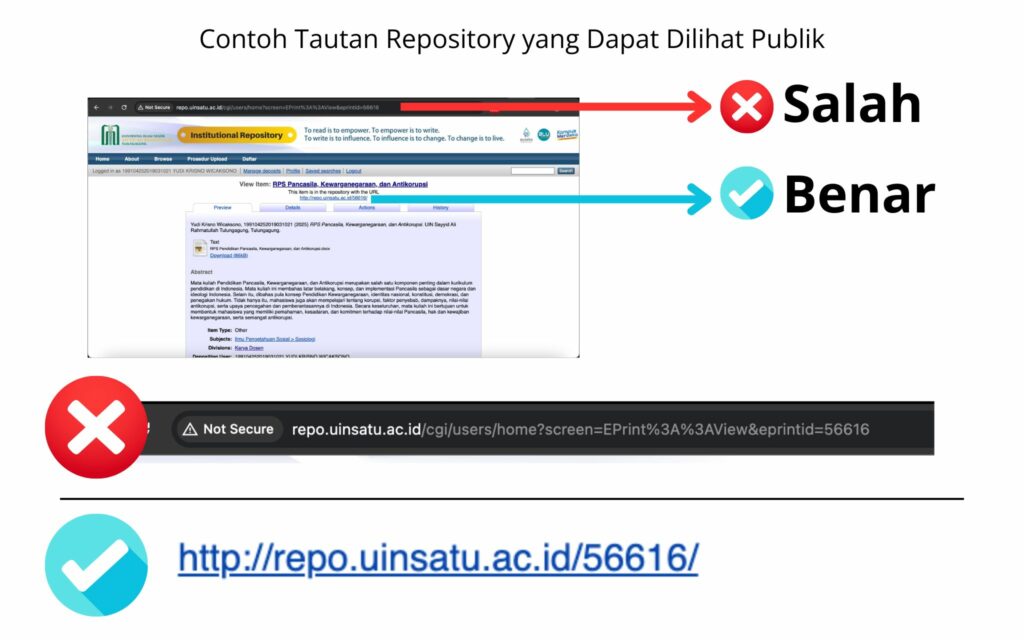
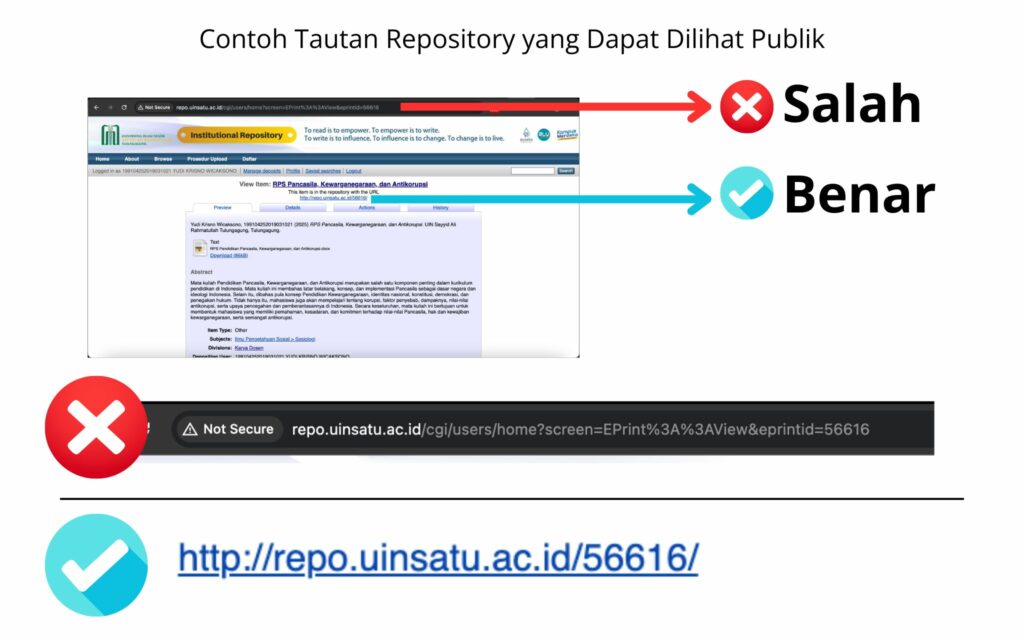
4. Select the correct link
- After the document is approved, Enter the Copy Link Document page (link) Under writing ” This item is in the repository with the URL“.
- Avoid links (link) from the upper url on browser.
- To ensure that the link can be accessed by the public, then it is recommended to try to open it on browser another or wear new incognito window.
- If it is definitely accessible to the public, then the repository link can be embedded in the desired document.
Examples of wrong links ❌
http://repo.uinsatu.ac.id/cgi/users/home?screen=EPrint%3A%3AView&eprintid=56616
Examples of the correct links ✅
http://repo.uinsatu.ac.id/56616/
5. Visualization Guide
- To facilitate, Please see Visualization Guide available in the form of step -by -step pictures/tutorials.
Notes:
*) Constraints in uploading in repository can contact the admin repository admin of the library
*) It is recommended to use a laptop to upload a document on the repository